
How to Make Cutouts: A Complete Step-by-Step Guide
Posted by Bruce on May 18th 2026
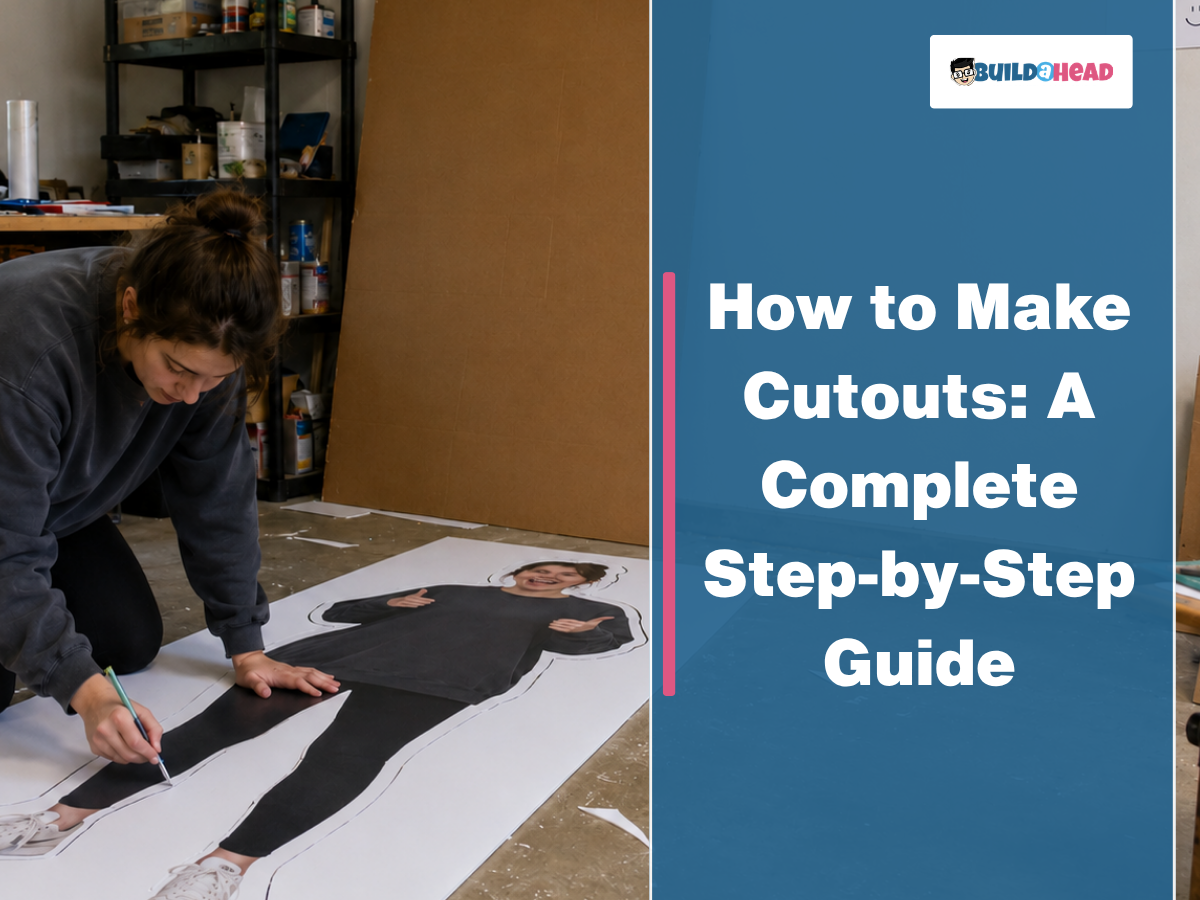
To make cutouts, choose the right cutout type, prepare a high-resolution photo, print and mount the design onto materials such as foam board, cardboard, cardstock, vinyl, or wood, then trim, assemble, and support the display based on its size and purpose. Popular options include big-head cutouts, life-size foam-board stand-ups, face cutouts, cardstock decorations, wood cutouts, and vinyl Cricut cutouts.
Each of these cutouts differs in material, scale, durability, and display method. For example, a life-size foam board cutout works as a freestanding event prop, while a paper snowflake cutout functions as a lightweight holiday decoration.
Creating a professional cutout also depends on selecting a high-resolution image with clean lighting, proper framing, and accurate scaling to maintain sharp print quality. Foam board and life-size cutouts require poster printing, spray adhesive, precision cutting tools, and reinforced support stands to remain upright at parties, graduations, sporting events, corporate displays, and photo booths.
What Are the Different Types of Cutouts You Can Make?
Different types of cutouts you can make include foam board, big-head, life-sized foam board, cardboard, cardstock, face, and vinyl cutouts. Each cutout uses a different material, size, display method, and purpose. For example, a life-size cardboard cutout of a basketball player works as an event prop, while a face cutout of the bride and groom works as a wedding photo booth prop or reception decoration.
9 different types of cutouts you can make are:
- Foam Board Cutouts: Lightweight, durable custom prints mounted on foam board for displays, events, and promotions.
- Big Head Cutout: Oversized face cutouts perfect for sports games, parties, graduations, and fan events.
- Life-Size Foam Board Cutout: Full-body, realistic standees made from high-quality foam board for photos and décor.
- Foam Board Cutout Stand Up: Free-standing foam board displays with easel backs for easy setup at any venue.
- Cardboard Cutout: Affordable custom standees printed on sturdy cardboard for events, advertising, or fun decor.
- Cardstock Cutout: Thin, lightweight cutouts printed on premium cardstock for crafts, signs, and decorations.
- Face Cutout: Personalized face-only cutouts ideal for cheering crowds, parties, and memorable photo moments.
- Wood Cutouts: Durable wooden shapes and custom designs perfect for rustic décor, crafts, and signage.
- Vinyl Cutouts: Weather-resistant vinyl graphics and decals designed for windows, walls, vehicles, and displays.
How to Make Foam Board Cutouts Step by Step?
To make foam board cutouts, begin by selecting a photo, printing it on high-resolution paper, trimming the print, applying spray adhesive, pressing the print onto the board, cutting the foam board, and attaching a backing stand for a freestanding display. These steps help you to create durable, clean, and professional foam board cutouts suitable for parties, events, photo booths, and personalized decorations.
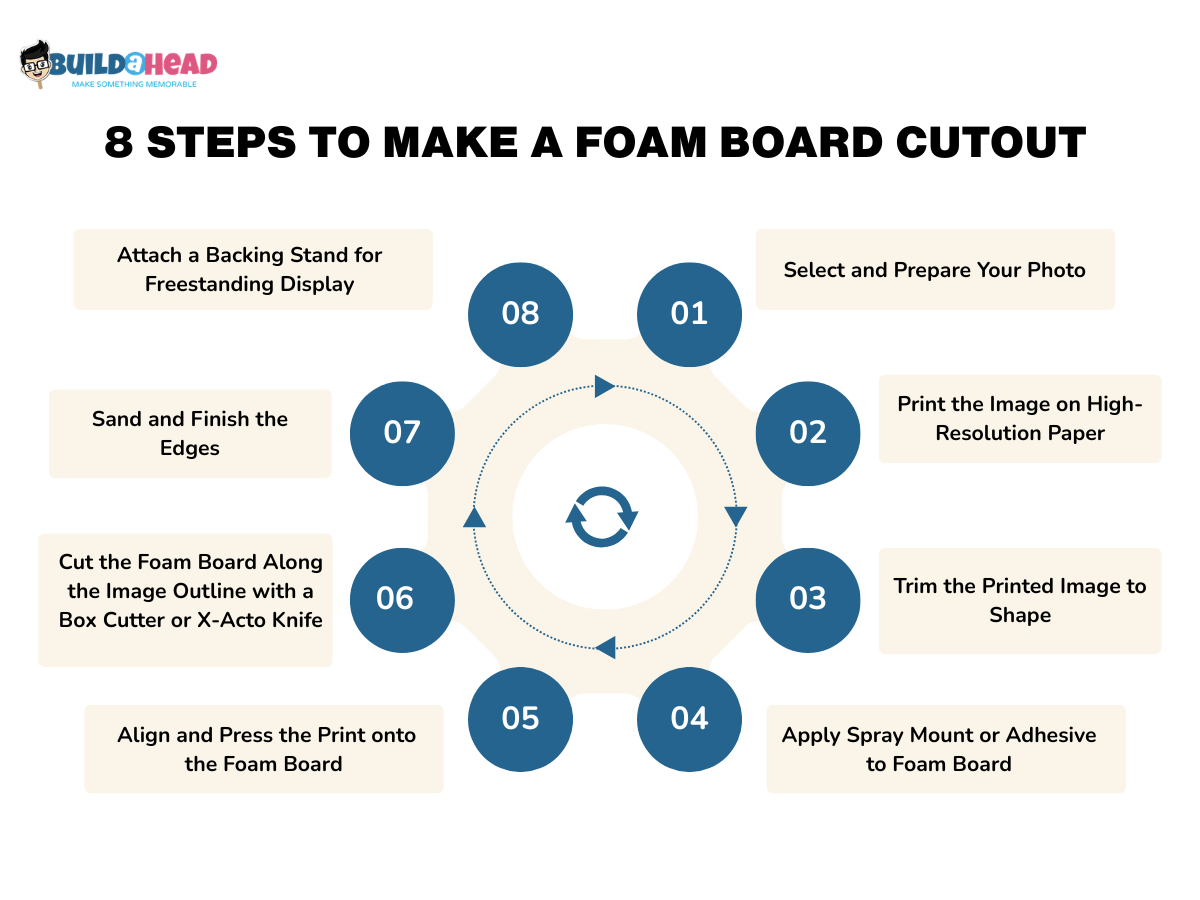
8 steps to make a foam board cutout are:
- Step 1 — Select and Prepare Your Photo
Begin by selecting a high-resolution photo and isolating the subject to create a clean cutout outline. Adjust the brightness, improve image clarity, and scale the file to the final display size before printing. Avoid blurry screenshots or low-quality social media photos because enlarged prints often appear pixelated. This step creates a sharp, print-ready image for the foam board cutout.
- Step 2 — Print the Image on High-Resolution Paper
Transfer your digital file to a physical medium using a professional-grade printer or a local print service to ensure vibrant colors and crisp details at a large scale. You must select a heavyweight matte or semi-gloss poster paper to prevent the ink from warping the sheet. A common mistake is using standard office paper, which is too thin and will bubble when adhesive is applied. The expected result is a vivid, full-scale poster of your subject.
- Step 3 — Trim the Printed Image to Shape
Use sharp scissors to trim excess white space around the subject before mounting the image onto the foam board. Leave a small margin around the outline to improve handling and alignment during attachment. Avoid cutting directly against the subject border because tight trimming can reduce mounting accuracy. This step creates a manageable template for the final cutout.
- Step 4 — Apply Spray Mount or Adhesive to Foam Board
Apply repositionable spray adhesive evenly across the foam board surface to create a strong, smooth bond between the print and the backing. Hold the spray can 8 to 10 inches away and coat the board with a light, consistent layer. Avoid excess glue or liquid school adhesive because uneven moisture can warp the foam board and wrinkle the print. This step prepares the backing for secure image mounting.
- Step 5 — Align and Press the Print onto the Foam Board
Carefully place the printed image onto the adhesive-coated foam board, starting at one edge and smoothing toward the opposite edge to prevent air bubbles. Use a soft cloth or brayer to flatten the surface evenly. Do not drop the entire print onto the board at once because folds and creases are difficult to remove. By the end of this step, it securely laminates the print onto the foam backing.
- Step 6 — Cut the Foam Board Along the Image Outline with a Box Cutter or X-Acto Knife
Cut around the subject outline using a sharp X-Acto knife or box cutter placed on a cutting mat for better precision and control. Make several shallow passes instead of forcing the blade through the foam board in one cut. Avoid dull blades because rough cutting can tear the foam core and leave jagged edges. This step forms the final foam board cutout shape.
- Step 7 — Sand and Finish the Edges
Refine the perimeter of your cutout with fine-grit sandpaper to smooth out any burrs or uneven edges. This step elevates the DIY project to a retail-quality finish. Gently run the sandpaper at a 45-degree angle along the cut edge, moving in a single direction to avoid tearing the paper face. Avoid aggressive sanding, which can delaminate the photo from the board. The expected result is a clean, professional edge that is smooth to the touch.
- Step 8 — Attach a Backing Stand for Freestanding Display
Attach a structural support to the rear of the board so the cutout can stand upright without assistance, transforming a flat board into a 3D display piece. You can glue a triangular easel flap made from scrap foam board to the center-back or attach a wooden dowel for handheld use. Avoid placing the stand too high or too low, as this can cause the cutout to tip forward or backward. By the end of this step, your foam board cutout is complete and ready for display.
How Do You Make a Big Head Cutout Step by Step?
To make a big head cutout, start with a clear, front-facing photo, enlarge the image to an oversized size, print it on poster paper, trim around the head outline, mount the print on foam board or cardstock, and attach a handle or stick for display. This process creates a lightweight, attention-grabbing custom big head cutout commonly used at sporting events, graduations, birthday parties, and other celebrations.
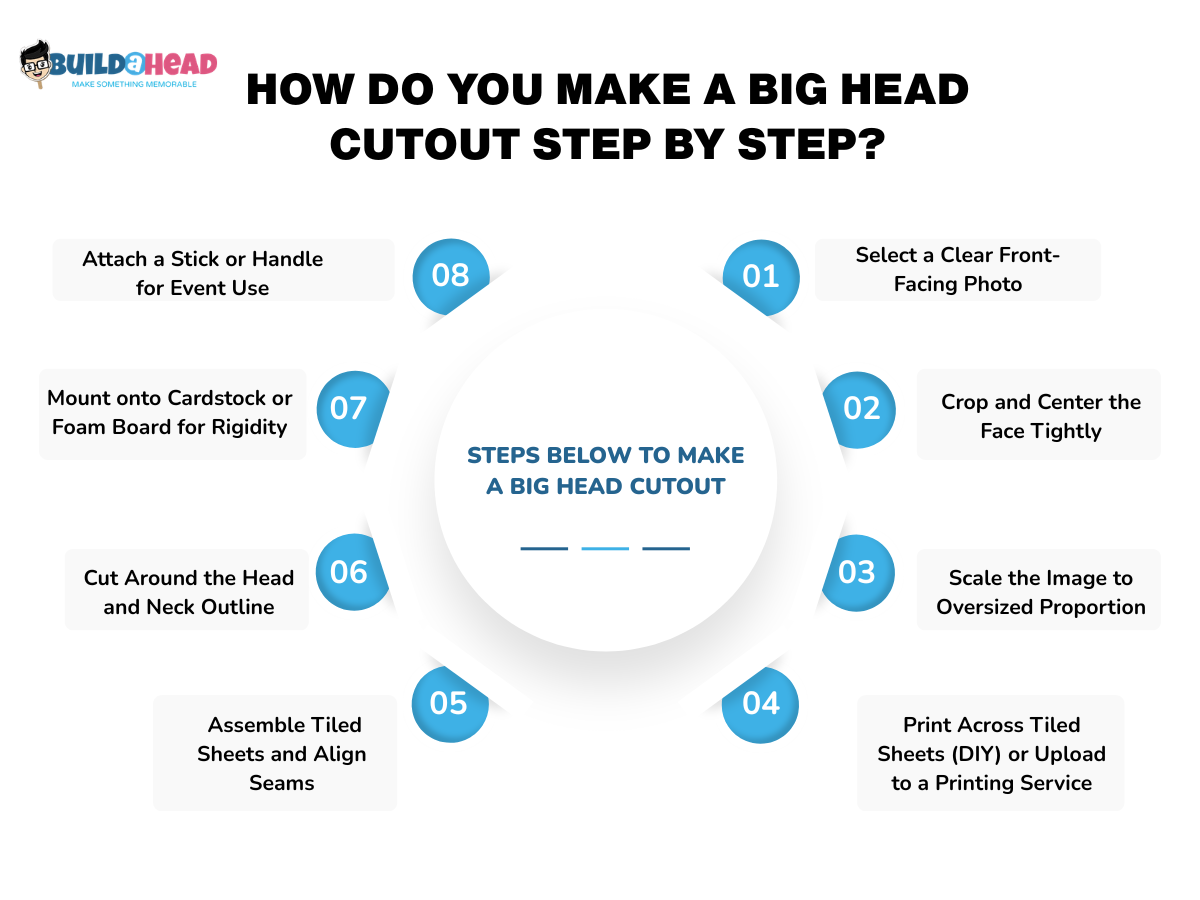
Follow the steps below to make a big head cutout:
- Step 1 — Select a Clear Front-Facing Photo
Choose a sharp, front-facing photo with balanced lighting and clear facial detail to create a recognizable big-head cutout. Select an image with an unobstructed, centered face to make scaling and trimming easier. For this step, avoid blurry photos, angled selfies, or heavily filtered images, as enlarged prints often lose clarity. This step creates a clean source image for the oversized cutout.
- Step 2 — Crop and Center the Face Tightly
Remove all unnecessary background elements, clothing, and shoulders to focus entirely on the head and neck. This step emphasizes the "Big Head" aesthetic by making the facial features the sole focal point. Also, use a photo editor to draw a tight boundary around the top of the hair and the base of the chin. A common mistake is leaving too much of the chest in the shot, which reduces the face's scale in the final print.
- Step 3 — Scale the Image to Oversized Proportion
Enlarge the cropped face to poster size using editing software or print settings to create a dramatic crowd-visible display. Most big-head cutouts range from 16 × 20 inches to oversized 24 × 36-inch formats for sports events and parties. Use the Image Size settings in your software to set the height while maintaining the aspect ratio. Do not stretch the image horizontally, which results in a distorted, fat face.
- Step 4 — Print Across Tiled Sheets (DIY) or Upload to a Printing Service
Convert your oversized digital file into a physical print by either using a professional poster service or tiling the image across multiple standard sheets at home to bridge the gap between a digital file and a physical prop. If printing at home, use software like "The Rasterbator" to split the image into sections. Avoid using low-quality draft print settings, which will result in dull colors.
- Step 5 — Assemble Tiled Sheets and Align Seams
Arrange and tape tiled print sections together carefully to form one complete oversized face image before mounting. Match the edges precisely and smooth the seams to minimize visible lines in the final cutout. Ensure there is no uneven alignment, as mismatched sections can distort facial features. This step creates a complete large-format head print.
- Step 6 — Cut Around the Head and Neck Outline
Use your scissors to trim away the excess white margins from your print, following the natural curve of the hair and jaw. This step prepares the image for a clean mount onto the rigid backing. Focus on smooth, continuous cuts rather than short, choppy snips. A common mistake is cutting too close to the ears and accidentally removing them. You should end up with a loose paper silhouette of the subject's head.
- Step 7 — Mount onto Cardstock or Foam Board for Rigidity
Apply a layer of spray adhesive to your foam board and press the trimmed paper face onto it, smoothing out any bubbles. It provides the structural integrity needed for the cutout to stay upright during use. Ensure the glue is tacky before placement to prevent the paper from sliding. Avoid using liquid glue sticks, which can cause the paper to ripple or soak through.
- Step 8 — Attach a Stick or Handle for Event Use
Secure a paint stick or wooden dowel to the back of the cutout using duct tape or strong adhesive for a handheld display. Position the handle near the center to improve balance and grip during events. Do not attach the stick too close to the edge because uneven support can cause tearing. This step creates a finished, big-head cutout ready for sports games, parties, and celebrations.
How Do You Make a Life-Size Foam Board Cutout Step by Step?
To make a life-size foam board cutout, begin with a full-body photo, scale the image to human height, print and assemble the panels, mount the print onto large foam board sections, cut around the outline, finish the edges, and attach a floor stand for support. Following this process creates a durable life-size standup commonly used for birthday parties, graduation celebrations, corporate events, retail displays, and photo booths.
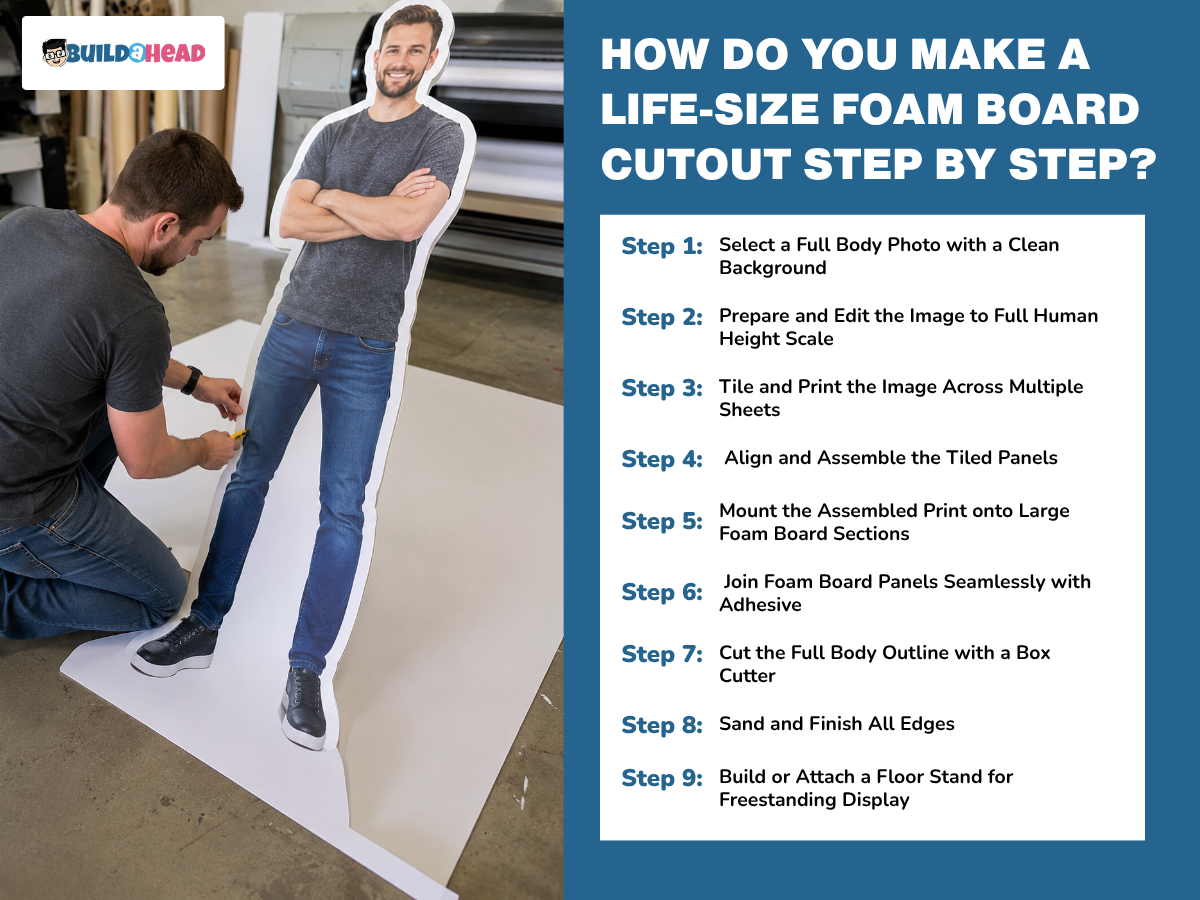
The step-by-step process to make a life-size foam board cutout is:
- Step 1 — Select a Full Body Photo with a Clean Background
Choose a high-resolution, full-body photo with vertical orientation, balanced lighting, and a clean background to create a realistic, life-size standup. Make sure the subject remains fully visible from head to feet for accurate scaling and trimming. Photos with cropped limbs, dark shadows, or busy backgrounds often produce rough outlines and weaker print quality. Following this step creates a clean source image for the cutout.
- Step 2 — Prepare and Edit the Image to Full Human Height Scale
Scale the image to the subject’s actual height using editing software or large-format print settings before production. Use a photo editor to set the canvas height to the real-world measurement at 150–300 DPI. Adjust brightness, sharpen details, and verify measurements with a tape measure to maintain realistic life-size proportions, as low-resolution images often appear blurry when enlarged to full-body size. For this step, do not ignore the aspect ratio, as it can make the subject look unnaturally thin or wide.
- Step 3 — Tile and Print the Image Across Multiple Sheets
Use tiling software such as Rasterbator to split the life-size image across multiple standard-sized pages for home or office printing. Set a small overlap margin between pages to make alignment easier during assembly, since fit-to-page printing often shrinks the image and breaks the life-size scale. The finished output should form a stack of numbered paper panels that combine into one oversized full-body print.
- Step 4 — Align and Assemble the Tiled Panels
Lay the printed sheets on a flat surface and overlap the edges carefully to reconstruct the full-body image before mounting. Secure the seams with clear tape on the back side to maintain a cleaner front appearance, because visible front-side tape lines can distract from the finished cutout. Proper alignment should create a single, large, continuous paper poster of the subject.
- Step 5 — Mount the Assembled Print onto Large Foam Board Sections
Apply spray adhesive evenly across the foam board, then slowly press the assembled poster onto the tacky surface to provide rigid support for the oversized print. Work section by section, smoothing air bubbles with a flat edge or brayer, as rushed placement often creates wrinkles and uneven bonding. Once mounted correctly, the print should feel smooth, laminated, and firmly attached to the foam board.
- Step 6 — Join Foam Board Panels Seamlessly with Adhesive
Join multiple foam board sections together when the subject exceeds the dimensions of a single board panel. Reinforce the rear seam using strong adhesive, hot glue, or a scrap foam board support strip to maintain structural stability across the full height. Tape alone may weaken under the weight of taller standups, leading to bending or buckling. Proper reinforcement should create one continuous rigid panel.
- Step 7 — Cut the Full Body Outline with a Box Cutter
Trace around the subject outline with a sharp box cutter or X-Acto knife, pressing through both the paper and the foam board. Use slow, controlled strokes with fresh blades to maintain smooth edges and accurate detail around the body shape, as heavy single-pass cuts often tear the foam or cause the blade to slip. The completed cut should fully separate the life-size figure from the surrounding scrap board.
- Step 8 — Sand and Finish All Edges
Smooth the cut edges using fine-grit sandpaper to remove rough foam crumbs and create a cleaner, professional finish. Sand in a downward direction to prevent the printed paper layer from lifting off the foam board, as coarse sandpaper or aggressive pressure can fray the edges. Proper finishing should leave the cutout with crisp, smooth, machine-like edges.
- Step 9 — Build or Attach a Floor Stand for Freestanding Display
Construct a wooden easel or “T” stand from plywood, screws, and vertical support braces to help the life-size cutout stand upright on its own. Secure the support firmly near the center back of the foam board, and use a weighted base for balance, as undersized stands may tip over at the display height. The completed structure should create a stable, freestanding, life-size foam board cutout suitable for events and photo booths.
How Do You Make a Foam Board Cutout Stand-Up Step by Step?
To make a foam board cutout stand-up, measure the size and weight of the cutout, create a folded foam board support strip, attach the support strip vertically to the back, allow the adhesive to dry completely, test the balance, and reinforce the structure if needed. This process creates a stable freestanding foam board display suitable for parties, events, storefronts, and photo booths.
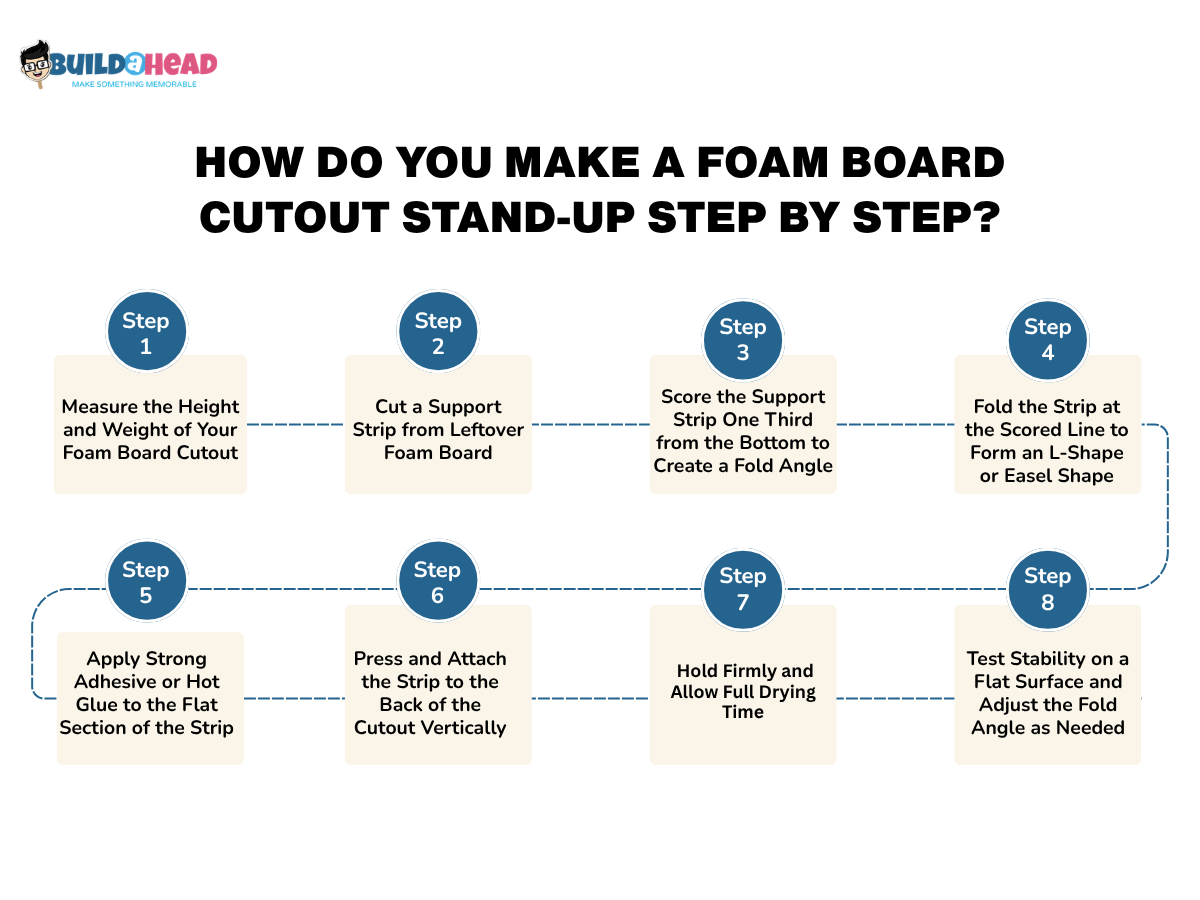
Below is the step-by-step process you can follow to make a foam board cutout stand up:
- Step 1 — Measure the Height and Weight of Your Foam Board Cutout
Measure the overall height, width, and weight distribution of the foam board cutout before building the stand to determine the required level of support. Larger displays with wide hats, extended arms, or oversized top sections often become top-heavy and require stronger reinforcement to remain upright without twisting or tipping.
- Step 2 — Cut a Support Strip from Leftover Foam Board
Cut a long rectangular strip from leftover foam board, usually 6 to 10 inches wide and about two-thirds the height of the cutout, to create the rear support brace. Straight edges provide better floor contact and stability, whereas strips cut too short usually fail to properly support the upper section of the stand-up.
- Step 3 — Score the Support Strip One Third from the Bottom to Create a Fold Angle
Use a sharp utility knife to score the foam strip halfway through, about one-third from the bottom, without cutting through the back paper layer. A clean horizontal score line creates a flexible hinge for folding, whereas deep cuts often weaken the support strip, causing it to snap during use.
- Step 4 — Fold the Strip at the Scored Line to Form an L-Shape or Easel Shape
Fold the scored section carefully to form an L-shape or easel-style brace that tilts slightly backward for improved balance. The angled support helps shift the center of gravity evenly across the base, while folding against the scored direction may tear the foam board or weaken the hinge point.
- Step 5 — Apply Strong Adhesive or Hot Glue to the Flat Section of the Strip
Apply heavy-duty adhesive or hot glue across the long flat section of the support strip that will attach to the back of the cutout. Concentrating glue along the center and edges improves surface bonding strength, whereas weak adhesives or thin tape commonly loosen under the pressure of taller standups.
- Step 6 — Press and Attach the Strip to the Back of the Cutout Vertically
Position the glued support strip vertically along the center back of the foam board cutout, and press firmly to secure the connection. Keeping the easel foot aligned with the bottom edge helps the display stand level, while off-center placement often causes the cutout to lean to one side.
- Step 7 — Hold Firmly and Allow Full Drying Time
Keep steady pressure on the support strip with clamps, heavy objects, or extra tape while the adhesive fully cures. Premature movement during drying may weaken the structural bond and reduce long-term stability, especially for life-size foam board cutouts used at events or storefront displays.
- Step 8 — Test Stability on a Flat Surface and Adjust the Fold Angle as Needed
Place the completed standup on a flat surface and check that the display remains balanced and does not wobble or tip. Increasing or tightening the fold angle can improve stability depending on the weight distribution, while carpeted surfaces may temporarily hide balance problems during testing.
- Step 9 — Reinforce with Additional Strips for Heavier or Taller Cutouts
Add extra foam board braces or secondary support strips to the rear of larger standups that feel unstable or exceed five feet in height. Matching the fold angle across all support braces improves weight distribution, while relying on a single thin strip often causes wide or oversized cutouts to bend over time.
How to Make a Cardboard Cutout Step by Step?
To make a cardboard cutout, begin by selecting a high-resolution photo, printing the image, trimming the print, applying spray adhesive, mounting the print onto cardboard, smoothing out, cutting along the traced outline, and attaching a backing stand for support. Following this process step by step creates a durable custom cardboard cutout suitable for birthday parties, sporting events, graduations, storefront displays, and photo booth decorations.
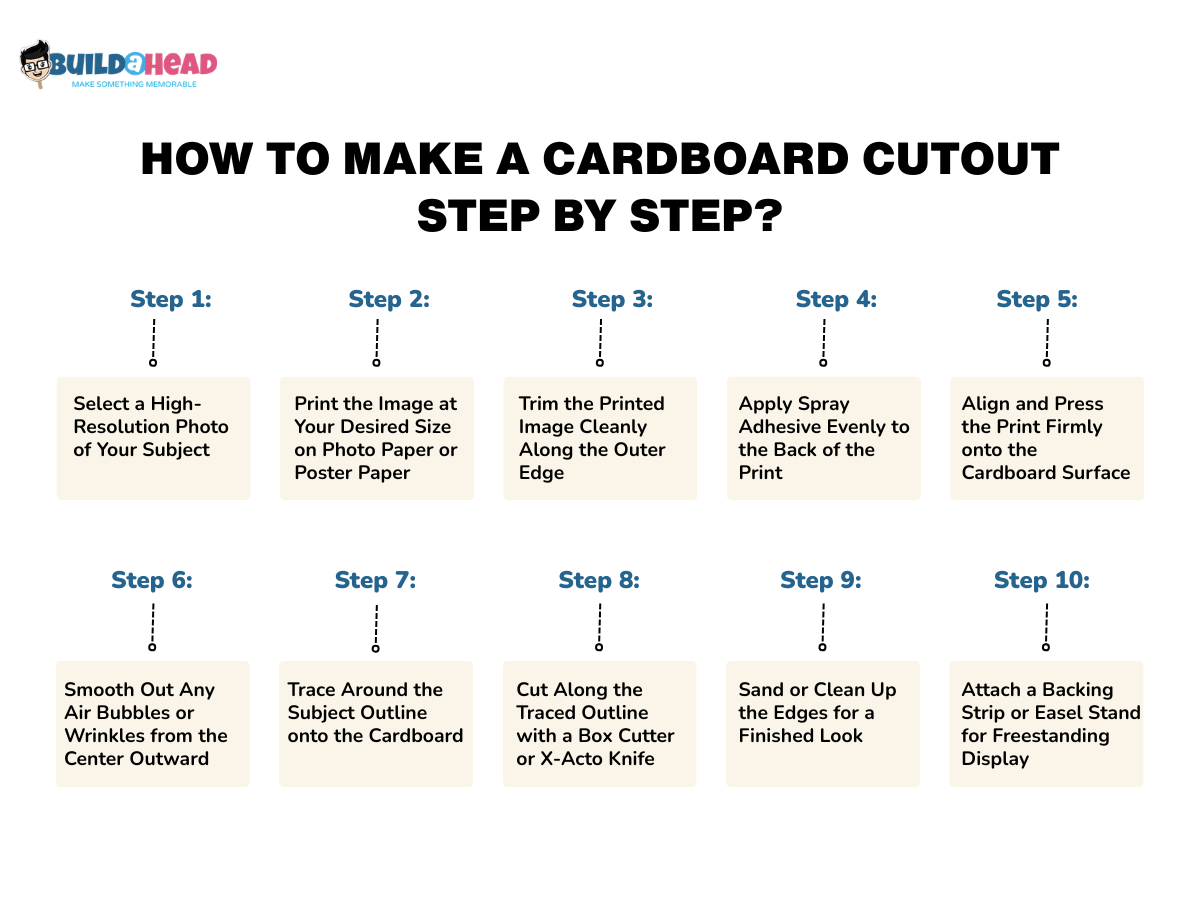
Below are the steps you can follow to make a cardboard cutout:
- Step 1 — Select a High-Resolution Photo of Your Subject
Choose a sharp, high-resolution image so the final cardboard cutout remains clear and detailed when enlarged. Full-body photos work best for life-size standups, while close-up portraits are ideal for face cutouts and big-head displays. Low-quality screenshots or compressed social media images often appear blurry or pixelated after printing.
- Step 2 — Print the Image at Your Desired Size on Photo Paper or Poster Paper
Upload the image into Canva or Rasterbator and scale it to your preferred size before printing. Large cutouts usually print across multiple 8.5 × 11-inch sheets with overlap margins for easier assembly. Draft-quality print settings may reduce sharpness and color quality, especially on oversized displays.
- Step 3 — Trim the Printed Image Cleanly Along the Outer Edge
Cut away the white paper margins from each printed sheet using scissors or a craft knife before assembly. Clean trimming helps the tiled pages align accurately, like a puzzle, and reduces visible seams in the final cardboard cutout.
- Step 4 — Apply Spray Adhesive Evenly to the Back of the Print
Apply spray adhesive or PVA glue evenly to the back of the assembled print to prepare it for mounting. Uneven glue application may create wrinkles, bubbling, or weak attachment points across the cardboard surface.
- Step 5 — Align and Press the Print Firmly onto the Cardboard Surface
Carefully place the printed image onto a clean, flat cardboard sheet and press it down gradually from one side to the other. If the cardboard is too small, join multiple pieces together with heavy-duty tape on the back for added support and stability.
- Step 6 — Smooth Out Any Air Bubbles or Wrinkles from the Center Outward
Smooth the mounted print from the center outward using a flat object or soft cloth to remove trapped air bubbles and wrinkles. Rushed placement or uneven pressure often creates permanent creases that affect the final appearance.
- Step 7 — Trace Around the Subject Outline onto the Cardboard
Trace around the subject outline onto the cardboard backing to create a visible cutting guide before trimming. Accurate tracing helps maintain smoother edges and cleaner body contours during cutting.
- Step 8 — Cut Along the Traced Outline with a Box Cutter or X-Acto Knife
Use a sharp box cutter, craft knife, or scissors to carefully cut along the subject's outline. A cutting mat beneath the cardboard helps protect the floor and improves precision when cutting around curved sections and small details.
- Step 9 — Sand or Clean Up the Edges for a Finished Look
Clean the rough edges of the cardboard with fine-grit sandpaper or trimming scissors to improve the overall finish of the cutout. Jagged edges or torn sections of cardboard can make the display look unfinished, especially on life-size stand-ups.
- Step 10 — Attach a Backing Strip or Easel Stand for Freestanding Display
Attach an easel-style cardboard stand, a wooden support strip, or a reinforced backing to help the cutout stand upright on its own. Taller displays may require additional cardboard braces or hot-glued reinforcement strips around weak areas, such as the legs or neck, for better stability.
How to Make a Cardstock Cutout Step by Step?
To make a cardstock cutout, choose or design your shape, print it onto cardstock, cut along the outline, score fold lines if needed, assemble layered pieces, and attach the finished cutout to a surface or backing. This process creates lightweight decorative cardstock cutouts commonly used for scrapbooking, classroom displays, party decorations, cupcake toppers, banners, and personalized event signage.
Here is the step-by-step process you can follow to make cardstock:
- Step 1 — Choose or Design Your Image or Shape
- Step 2 — Print the Design onto Cardstock at Full Size
- Step 3 — Let the Print Dry Completely Before Cutting
- Step 4 — Cut Along the Outline with Scissors or a Craft Knife
- Step 5 — Score Any Fold Lines with a Bone Folder if Needed
- Step 6 — Assemble or Layer Multiple Pieces if the Design Requires It
- Step 7 — Attach to a Surface, Frame, or Backing as Needed
How to Make a Face Cutout Step by Step?
To make a face cutout, select a clear portrait photo, remove the background, resize and print the image, cut around the outline, mount it onto foam board or cardstock, attach a wooden stick, and allow the adhesive to dry before use. Following this process step by step creates a lightweight handheld face cutout commonly used for sporting events, graduations, weddings, birthday parties, and photo booth displays.
The following are the steps you can follow to make a face cutout:
- Step 1 — Select a Clear Front-Facing Portrait Photo
- Step 2 — Remove or Clean Up the Background Using Canva or Photoshop
- Step 3 — Resize the Image to Your Desired Face Size
- Step 4 — Print the Image on Cardstock or Photo Paper
- Step 5 — Cut Along the Face Outline with Scissors or an X-Acto Knife
- Step 6 — Mount onto Foam Board or Cardstock for Rigidity
- Step 7 — Attach a Wooden Stick or Dowel to the Back with Duct Tape
- Step 8 — Allow Adhesive to Dry Before Use
How to Make Wood Cutouts Step by Step?
To make wood cutouts, select and print a design template, transfer the outline onto wood, secure the board with clamps, cut along the shape using a jigsaw or scroll saw, sand the edges, apply paint or stain, and allow the finish to dry completely before display. This process creates durable wood cutouts commonly used for door hangers, wall art, personalized signs, seasonal decorations, and party displays.
Below are the steps you can choose to make a wood cutout:
- Step 1 — Select and Print Your Design or Shape Template
- Step 2 — Transfer the Template onto the Wood Surface with Carbon Paper or Tracing
- Step 3 — Secure the Wood Piece to a Work Surface with Clamps
- Step 4 — Cut Along the Outline with a Jigsaw or Scroll Saw
- Step 5 — Sand All Edges and Surfaces Smooth
- Step 6 — Apply Paint, Stain, or Sealant as Desired
- Step 7 — Allow Full Drying Time Before Handling or Displaying
How to Make Vinyl Cutouts Step by Step?
To make vinyl cutouts, import the design, load the vinyl onto a cutting mat, adjust the blade settings, cut and weed the design, apply transfer tape, and press the vinyl onto the target surface, then remove the transfer layer. The finished process creates precise adhesive vinyl graphics commonly used for decals, water bottles, storefront signs, custom lettering, wall graphics, and personalized party decorations.
Here are the step-by-step instructions to make a vinyl cutout:
- Step 1 — Design or Import Your Image into Cricut Design Space or Silhouette Studio
- Step 2 — Mirror the Design If Applying via Heat Transfer Vinyl
- Step 3 — Load the Vinyl Sheet onto the Cutting Mat
- Step 4 — Set the Correct Blade Depth and Pressure for Your Vinyl Type
- Step 5 — Run the Cut and Allow the Machine to Complete the Pass
- Step 6 — Weed Away the Excess Vinyl with a Weeding Tool
- Step 7 — Apply Transfer Tape Over the Design
- Step 8 — Press onto Your Surface and Smooth Out Air Bubbles
- Step 9 — Peel Back the Transfer Tape at a Low Angle
How to Choose the Right Photo for Your Cutout?
To choose the right photo for a cutout, select a high-resolution file quality, a well-lit background, and use proper framing and angle. These factors help create cleaner outlines, sharper print quality, accurate scaling, and a more professional finish for big-head cutouts, foam-board standups, and life-size cardboard cutouts.
3 key considerations to consider while choosing the right photo for your cutout are:
- Resolution and File Quality
High-resolution photos, over 1MB or 2200-2800 pixels in height, create sharp, clear cutouts with smooth edges and accurate print detail, even when enlarged. Low-quality files, on the other hand, produce blurry prints, pixelated outlines, or distorted facial features, especially on life-size cardboard cutouts and oversized big-head displays. Most printing services recommend large, high-resolution image files because life-size cutouts require higher print resolution to maintain image quality at full scale.
- Background and Lighting
Clean backgrounds and balanced lighting make the subject easier to separate from the image, producing a cleaner cutout outline. Dark shadows, cluttered backgrounds, or uneven lighting often create rough edges and inaccurate trimming during production. Bright natural lighting works especially well for face cutouts, photo cutouts, and foam board standups because it improves facial detail and color accuracy.
- Framing and Angle
Proper framing keeps the subject centered and fully visible within the photo area, while a straight camera angle improves realism after printing a cutout. Cropped body parts, tilted angles, or distant shots can reduce cutout quality and make scaling difficult for life-size standups or full-body displays. Front-facing portraits usually work best for large-head cutouts, while vertical full-body photos are ideal for life-size foam-board cutouts and custom stand-ups.
How Much Does It Cost to Make a Foam Board Cutout?
A foam board cutout costs between $20 and $200+, depending on the size, print dimensions, material quality, stand support, shipping, and whether you make the cutout at home or order it from a professional printing service. Small DIY big-head cutouts made with poster prints and foam board cost around $20 to $50, while professional life-size cardboard cutouts with foam backing, waterproof printing, and custom stands range from $80 to $200 or more.
The total price to make a foam board cutout increases with larger print dimensions, premium foam-backed materials, stronger stand supports, and oversized life-size displays. Foam board products such as big head cutouts, life-size standups, event photo props, promotional displays, and custom character cutouts may cost more when they require high-resolution printing, custom die-cut finishing, reinforced backing, overnight shipping, or bulk production. For example, a single 24 × 36-inch big head cutout usually costs less than a custom 6-foot life-size foam board standup with reinforced backing and shipping included.
Should You Make a Cutout at Home or Order One Online?
You should make a cutout at home for a lower-cost DIY option for birthday parties, graduations, or one-time events, whereas you should order online if you need professional print quality and durable, foam-backed materials. DIY cutouts work well for smaller projects and same-day customization, while professionally ordered cutouts usually provide cleaner die-cut finishing, stronger stand support, waterproof printing, custom cutouts, and easier setup for events or business displays.
Make a cutout at home if you:
- Want a lower-cost option using local materials or home printing.
- Need a same-day, big-head cutout or a quick party decoration.
- Enjoy DIY crafting and manual customization.
- Only need small face cutouts, cardstock cutouts, or simple foam board displays.
- Want full control over cropping, scaling, trimming, and assembly.
Order a cutout online if you:
- Need a life-size cutout or oversized foam board standup.
- Want high-resolution professional printing with sharper detail and color quality.
- Need waterproof, laminated, or foam-backed materials for durability.
- Want precise die-cut finishing without manual trimming.
- Need bulk orders for corporate events, sports games, graduations, or retail displays.